


Voice UI Design in 2026: Best Practices, Prototyping, and the Future of Conversational UX

The way we interact with technology is fundamentally changing. By 2026, voice interfaces have evolved from rigid command-and-control systems into fluid, context-aware conversational agents that understand intent, adapt to tone, and respond with near-human naturalness. This isn’t just a technological shift—it’s a paradigm change in how we design digital experiences.
If you’re still designing voice interfaces like it’s 2020, you’re already behind. The emergence of hybrid voice AI architectures, sub-300 millisecond latency, and multimodal integration has redefined what users expect from conversational experiences. This comprehensive guide will equip you with the advanced knowledge, practical frameworks, and actionable strategies you need to design voice interfaces that don’t just work—they delight.
What Is Voice UI and Why It Matters More Than Ever in 2026

Voice User Interface (VUI) design is the discipline of creating experiences where users interact with digital systems primarily through spoken language rather than traditional touch or graphical interfaces. Unlike the early days of voice assistants that required precise, robotic commands, modern VUIs leverage natural language processing and large language models to understand conversational intent, context, and even emotional nuance.
The statistics tell a compelling story. Approximately 60% of millennials regularly use voice assistants, with that number projected to reach 70% for younger generations.In 2024 alone, 64% of US households owned an Amazon Echo, and 47% of companies deployed voice AI solutions. The conversational AI market is expanding at an 18.66% compound annual growth rate through 2030, with businesses reporting average returns of $3.50 for every dollar invested, and top performers achieving $8 per dollar.
But the real reason voice UI matters in 2026 isn’t just adoption rates or ROI figures. It’s about accessibility, efficiency, and meeting users where they are. Voice interfaces dramatically improve usability for individuals with visual or motor impairments, provide essential control in hands-free environments like cars and kitchens, and automate high-volume routine tasks that would otherwise require expensive human labor. When designed well, voice becomes the most natural, intuitive way for humans to communicate with machines, because it mirrors how we’ve communicated with each other for millennia.
The Seismic Trends Reshaping Voice UX in 2026
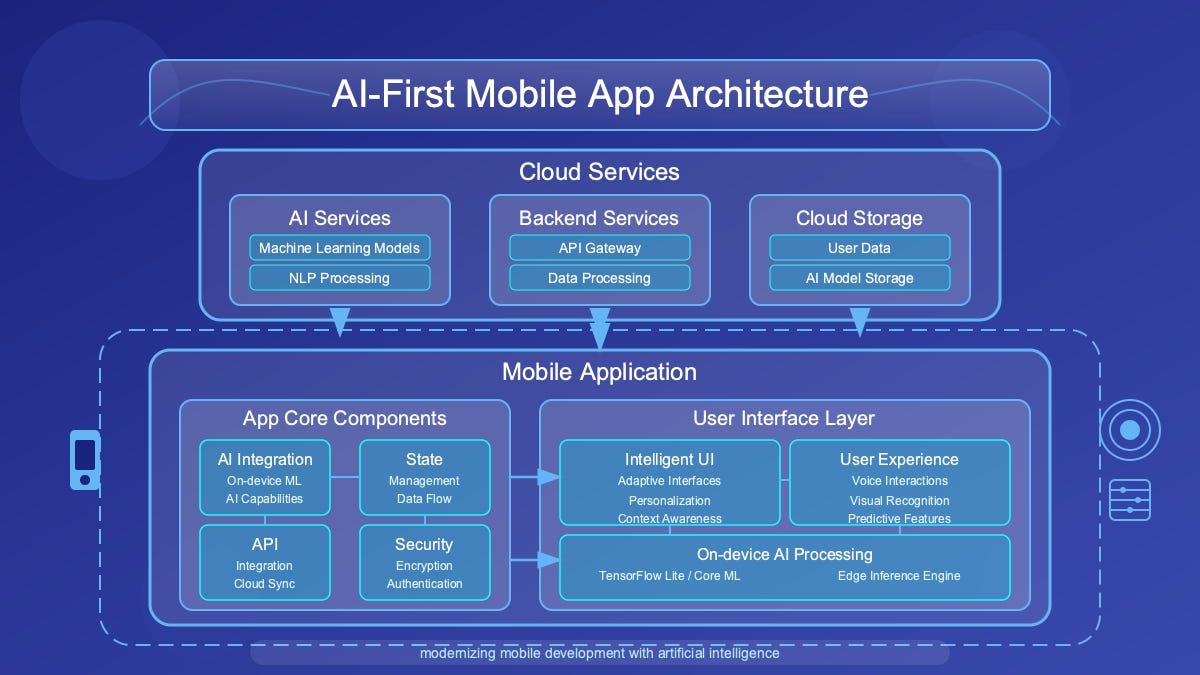
Voice interface design has matured rapidly, driven by three structural innovations that separate legacy systems from production-ready experiences.
Hybrid Voice AI: Device-First, Cloud-Augmented Architecture
The most significant architectural shift in voice design is the move from cloud-centric pipelines to hybrid models that prioritize on-device computation. This dual-system approach mimics human cognition, fast, local reflexes for immediate responses, and slow, deliberate cloud-based reasoning for complex queries. By processing voice commands locally, these systems achieve the sub-300 millisecond response times that replicate natural human dialogue rhythm while simultaneously addressing privacy concerns and reducing dependency on network connectivity.
For designers, this means you can now create experiences that feel instantaneous and maintain contextual awareness even in offline or low-connectivity scenarios. Device-first architecture also enables emotional intelligence capabilities, systems that detect and adapt to user tone, frustration, or urgency, creating genuinely empathetic interactions.
Spatial Awareness and 3D Acoustic Intelligence
Legacy direction-of-arrival (DOA) technology is obsolete. Modern voice systems now incorporate three-dimensional acoustic scene understanding and robust multi-speaker separation. This spatial hearing AI can distinguish between a direct command and ambient conversation, identify who is speaking through voice biometrics, and determine where someone is positioned in 3D space through acoustic localization.
The implications for UX design are profound. You can now design voice experiences for multi-user environments, think family homes, open-plan offices, or retail spaces, where the system accurately identifies the intended speaker and maintains separate conversational contexts for different users simultaneously. This spatial awareness transforms voice from a single-user utility into a genuinely shared interface.
From Command-Based to Cognition AI: The Rise of Agentic Interfaces
Perhaps the most transformative trend is the shift from rigid command recognition to context-aware conversational agents powered by small language models (SLMs) running on-device. These cognition AI systems don’t just transcribe words—they understand workflow, intent, and conversational memory. They can handle follow-up questions, understand pronouns and implicit references, and maintain rich contextual awareness across conversations.
IDC’s FutureScape 2026 calls this the “Rise of Agentic AI“, systems that stop being passive tools and start acting as proactive teammates. Instead of users adapting their language to match system constraints, the interface adapts to understand how users actually speak. This is conversational UX at its most sophisticated.
Multimodal Integration: Voice + Vision + Gesture
Voice-only experiences are giving way to multimodal interfaces that seamlessly blend voice with visual displays, touch input, and even gesture recognition. In cars, voice commands merge with map displays and camera sensors to provide hands-free navigation. In smart home systems, you might say “turn on the lights” while pointing at a specific room, and the system uses your gesture for spatial clarification.
The future of VUI isn’t voice-only; it’s voice-first with intelligent fallback and enhancement through other modalities. Users switch between voice, text, and touch based on context, privacy in public spaces, precision for complex inputs, or speed for simple commands. Your voice interface design must account for these hybrid interaction patterns.
Core Principles of Exceptional Voice UX Design
Building world-class voice interfaces requires mastering seven foundational principles that separate amateur implementations from professional-grade experiences.
1. Understand User Needs and Context Deeply
Great voice design begins with obsessive user research. You must understand not just what users want to accomplish, but the environmental context in which they’ll use voice.
Are they driving with road noise?
Cooking with running water?
In a quiet bedroom at night?
Each context demands different interaction patterns, feedback mechanisms, and error handling strategies.
Amazon’s Alexa exemplifies this principle, the system provides different responses based on detected environmental noise, time of day, and historical usage patterns. Your voice interface should adapt similarly, becoming more verbose in noisy environments and more concise when users demonstrate expert-level familiarity with your system.
2. Simplify Interactions and Reduce Cognitive Load
Voice interfaces must enable users to accomplish tasks with minimal mental effort using natural, intuitive commands. This means accepting multiple phrasings for the same intent, “What’s the weather?“, “Tell me the weather”, “Weather today”, rather than forcing users to memorize rigid syntax.
The cardinal rule: users should never have to remember specific commands. Guide them implicitly through the conversation with clear prompts and offer progressive disclosure. Don’t present 15 options at once; instead, surface the most common paths and provide a natural way to explore alternatives.
3. Provide Clear, Multi-Sensory Feedback
In traditional GUI design, users have constant visual confirmation of system state. Voice interfaces lack this inherent feedback, creating uncertainty. You must compensate through explicit confirmation strategies, verbal acknowledgments (“Got it, setting a timer for 10 minutes”), audio cues (earcons for successful actions), and visual indicators on screened devices.
The best voice experiences synchronize multiple feedback channels. When a user issues a command, they might hear a brief tone (immediate acknowledgment), see a visual animation (if a screen is present), and receive a verbal confirmation (explicit validation). This multi-sensory approach builds user confidence and reduces the anxiety of not knowing if the system heard correctly.
4. Design for Accessibility from Day One
Voice interfaces offer unprecedented opportunities for accessibility—and equally significant risks if designed poorly. The Web Content Accessibility Guidelines (WCAG) framework provides four core principles for accessible voice design: perceivable (provide text equivalents for audio), operable (support alternative inputs like keyboards), understandable (use clear language and predictable responses), and robust (ensure compatibility with assistive technologies).
Implement multimodal compatibility so users can switch between voice, text, and touch based on their abilities and preferences. For users with cognitive impairments, use simplified language and allow extended response times without timeouts. For those with speech differences, implement adaptive recognition that learns individual speech patterns over time. Accessibility isn’t a feature, it’s a fundamental design requirement.
5. Handle Errors Gracefully with Conversational Repair
Errors are inevitable in voice interfaces—background noise, accents, unclear pronunciation, or genuinely ambiguous requests. The difference between frustrating and delightful experiences lies in how you handle these failures. Design robust error recovery flows that include implicit confirmations (“I’m setting a timer for 15 minutes, say ‘stop’ if that’s wrong”), rapid reprompts (“I didn’t catch that, could you repeat?”), and escalation paths to human assistance when automated systems reach their limits.
Never make users feel like errors are their fault. Use language like “I didn’t understand that” rather than “You said it wrong.” Provide helpful recovery options: “Did you mean X or Y?” rather than simply asking them to repeat.
6. Maintain Privacy and Security as Core Values
Voice interfaces continuously listen for wake words, creating legitimate privacy concerns about unintended data collection. Be radically transparent about what data you collect, how long you retain it, and who has access. Implement explicit opt-in consent flows rather than defaulting to maximum data capture, and provide users with straightforward controls to review, manage, and delete voice recordings.
From a technical standpoint, employ end-to-end encryption for voice data transmission, anonymize or pseudonymize stored data wherever possible, and conduct regular security audits to identify vulnerabilities. Privacy isn’t just about compliance, it’s about earning user trust in an era of heightened data consciousness.
7. Commit to Continuous Improvement Through Analytics
Voice interfaces improve through iterative refinement based on real-world usage data. Instrument your system to capture key metrics: intent recognition accuracy, conversation completion rates, error frequencies, user satisfaction scores, and abandonment points. Analyze this data to identify where users struggle, what phrases they use that your system doesn’t recognize, and which flows create friction.
The most sophisticated voice designers conduct regular “conversation mining”, listening to (with proper consent and privacy protections) actual user interactions to identify patterns, pain points, and opportunities for enhancement. This ongoing optimization cycle separates good voice experiences from exceptional ones.
Voice UI Best Practices with Real-World Applications
Theory becomes actionable through concrete implementation strategies. Here are the battle-tested practices that leading organizations use to create superior voice experiences.
Design Conversational Flows That Mirror Human Dialogue
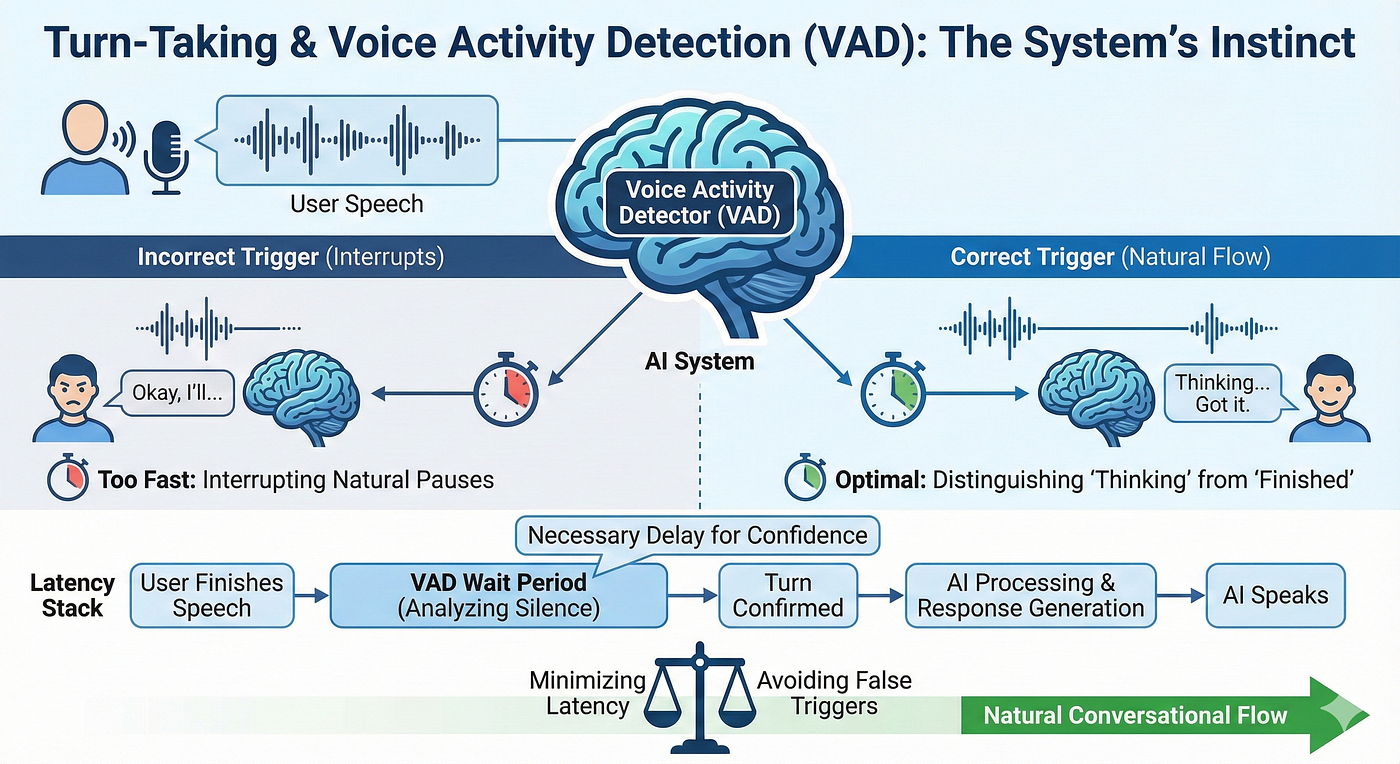
Effective voice interfaces follow natural conversational patterns including turn-taking, appropriate acknowledgments, and response variability to maintain engagement. Begin by identifying the goal of each interaction, then write sample conversations as if two humans were speaking—not as if a human were commanding a computer.
Your dialogue should balance efficiency with clarity. Keep voice prompts brief to avoid information overload—users can only process 5-7 items aurally—and break complex information into digestible chunks. Use a conversational, human-like tone that sounds empathetic and helpful rather than robotic or overly formal.
When Google Assistant and Alexa handle routine queries like weather or timers, they vary their responses slightly to avoid repetitive experiences. Instead of saying “The temperature is 72 degrees” every single time, the system might alternate with “It’s 72 degrees out” or “Expect 72 degrees today.” This novelty maintains engagement and feels more natural.
Use Specific Commands to Minimize Ambiguity
Ambiguity creates confusion and errors. Instead of open-ended questions like “When would you like to be reminded?”, use directed prompts: “Should I remind you in 30 minutes or tomorrow morning?” This approach guides users toward clear, actionable responses while reducing the cognitive burden of formulating a complete answer.
However, specific commands shouldn’t mean rigid commands. Your system should still accept variations, if you ask “Should I remind you in 30 minutes or tomorrow morning?” and the user responds “tonight at 8”, the system should intelligently handle that deviation rather than forcing the user back into your predetermined options.
Implement Implicit Confirmations for Streamlined Interactions
Explicit confirmations (“You want to set a timer for 10 minutes, is that correct?” “Yes”) create tedious, inefficient conversations. Instead, use implicit confirmations that embed acknowledgment into forward progress: “Setting your 10-minute timer now” or “Your timer for 10 minutes starts now.”
Reserve explicit confirmations for high-stakes actions, financial transactions, irreversible deletions, or sensitive data changes, where the cost of errors outweighs the benefit of conversational efficiency.
Plan for Human-Agent Handover Before You Need It
Automation typically handles 80% of interactions, which come from just 20% of total possible use cases. The remaining 20% of interactions, complex problems, emotional situations, edge cases, require human intelligence. Designing seamless escalation paths from bot to human agent is not optional; leading messaging platforms require it.
Make the transition explicit and smooth: “I’m connecting you with a specialist who can help with that” rather than abruptly dropping users into a queue. Provide the human agent with full context from the automated conversation so users don’t have to repeat themselves, context transfer is essential for maintaining satisfaction during escalation.
Leverage Rich, Visual Elements on Screened Devices
Text-only voice experiences create unnecessarily flat interactions. On devices with displays, smart speakers with screens, mobile apps with voice features, automotive interfaces, combine voice with visual elements to create richer, more effective experiences.
Convert lengthy voice prompts into scannable visual options. While the assistant might say “Here are some options,” display those options as interactive cards or carousels that users can visually scan and tap. This multimodal approach maximizes both efficiency and accessibility, allowing users to choose their preferred interaction method for each step of the flow.
Personalize Based on Context and Historical Interactions
Voice interfaces become dramatically more useful when they leverage contextual awareness and personalization. Consider the user’s location, time of day, past interactions, and stated preferences to tailor responses. A fitness app voice assistant might remember that the user always does cardio on Mondays and proactively suggest relevant workouts without requiring explicit requests.
This contextual intelligence should feel helpful rather than creepy. Be transparent about what data you’re using and why, and give users control over personalization settings. The goal is to reduce friction and anticipate needs, not to demonstrate how much you know about them.
Common Voice UI Design Mistakes to Avoid
Even experienced designers make predictable errors when building voice interfaces. Anticipate and avoid these common pitfalls.
Poorly Defining the Use Case
Jumping directly into development without clearly defining what specific problems your voice interface solves leads to unfocused work and unmet expectations. Before writing a single line of dialogue or code, articulate precisely which user tasks will become easier, faster, or more accessible through voice interaction. Not everything benefits from voice, be strategic about where it adds genuine value.
Designing Text-Only Experiences Without Rich Elements
Voice-only or text-only chatbots fall flat because they ignore the power of rich conversational elements. Buttons, carousels, images, quick-reply chips, and structured cards dramatically improve user comprehension and interaction efficiency. Define which rich elements make information clearer and interactions faster, then implement them thoughtfully.
Creating Conversational Dead-Ends
Few things frustrate users more than reaching a point in the conversation where they don’t know what to say or do next. Map out all possible conversation outcomes during your design phase, including edge cases, error states, and off-topic user inputs. Provide clear next-step prompts, “what else can I do?” meta-navigation, and graceful ways to restart or exit the conversation.
Overcomplicating with Unnecessary AI
AI is not always the answer. Many teams waste time and resources trying to implement sophisticated natural language understanding when rule-based bots would handle their use cases perfectly well. Before investing in complex AI, map your decision tree using flowchart tools. If your use case involves predictable, structured interactions with limited variations, rule-based logic is faster to build, easier to maintain, and often more reliable than attempting to train custom AI models.
Ignoring Privacy and Security from the Start
Treating privacy and security as afterthoughts rather than foundational requirements creates technical debt and user distrust. Voice data is uniquely sensitive, it contains biometric information, reveals emotional states, and can include confidential details users wouldn’t otherwise share in writing. Implement encryption, anonymization, explicit consent, and user data controls from day one, not as post-launch patches.
Voice UI Prototyping: Tools and Methods That Work
Effective prototyping accelerates development, reduces costs, and improves final product quality. Here’s a practical six-step framework for voice interface prototyping.
Step 1: Define Use Cases and User Stories
Begin by identifying the specific user stories your voice interface will serve, discovering new content, accessing personalized recommendations, completing transactions, getting support. For each story, map the user journey from discovery (how do they find your skill?) through installation, registration, activation, and ongoing engagement.
Document intents (what users want to accomplish), sample utterances (how they’ll phrase requests), and request phrase variations (cultural and linguistic differences in how people express the same intent). This research foundation informs every subsequent design decision.
Step 2: Map Conversation Flows with Flowchart Tools
Visual flowcharts keep your conversation scripts organized and identify logical gaps before development. Use tools like Miro, Whimsical, or draw.io to create decision trees that map how users navigate through your voice experience, including happy paths, error branches, and edge cases.
Your flowcharts should clearly indicate system prompts, user response options, branch logic, confirmations, and escalation points. This visual artifact becomes the single source of truth that aligns designers, developers, and stakeholders throughout the project.
Step 3: Script the Dialogue
Write out the actual words your voice interface will say and the variations of what users might say in response. This is conversation design at its most concrete, word choice, tone, pacing, and personality all matter. Read your scripts aloud (better yet, have colleagues who weren’t involved in writing them read them) to identify awkward phrasing, unclear instructions, or unnatural language patterns.
Build in response variability to avoid repetitive, robotic experiences. If users frequently ask the same question, your assistant should have 3-5 different ways to answer it that feel fresh.
Step 4: Build Low-Fidelity Prototypes
Before investing in full development, create rapid prototypes using voice design tools. Voiceflow offers a collaborative environment for prototyping voice applications for Alexa and Google Assistant without coding. ProtoPie’s voice prototyping feature (version 5.1+) enables designers to add voice interactions to existing designs. Adobe XD includes voice prototyping capabilities that let you trigger design actions with voice commands. Botsociety specializes in designing the fine details of conversational experiences including voice interfaces.
These tools let you test conversation logic, identify flow problems, and refine dialogue before committing to production development, saving time and money.
Step 5: Choose the Right Text-to-Speech Voice
Voice selection profoundly impacts user perception of your brand and interface. Consider factors like accent, gender, age, speaking pace, and personality. The voice should align with your brand identity and user expectations—a meditation app benefits from a calm, soothing voice while a sports app might use an energetic, dynamic voice.
Modern text-to-speech systems offer remarkable naturalness, but test multiple options with representative users to gauge preferences and ensure clarity across different accents and environments.
Step 6: Test with Real Users and Iterate
Launch your voice interface to a limited audience and collect detailed analytics on actual usage. Platforms like Chatlayer provide analytics dashboards that reveal the most common use cases, intent recognition accuracy, conversation abandonment points, and languages you’re missing.
Use both quantitative data (completion rates, error frequencies) and qualitative feedback (user interviews, satisfaction surveys) to identify improvement opportunities. Voice interface excellence comes through iterative refinement based on real-world performance data.
AI and Voice Interfaces: The LLM Revolution
Large language models have fundamentally transformed voice interface capabilities, enabling sophisticated conversational experiences that were impossible just years ago.
How Modern LLMs Power Conversational AI
Behind every advanced voice interface is a complex technical stack. Modern conversational AI systems use machine learning, generative AI, and large language models to handle dialogue while automation and business logic enable action-taking like transferring to customer service agents or completing transactions.
Key growth drivers for conversational AI include advances in LLM-based natural language processing (up 5.8%), increased messaging app usage (up 4.2%), and pressure to reduce 24/7 support costs (up 3.1%). These improvements translate directly into better user experiences—more accurate intent recognition, more contextually appropriate responses, and more natural conversation flow.
Selecting the Right LLM for Your Voice Application
Not all language models are created equal for conversational use cases. In 2026, the leading open-source LLMs for chatbots and voice applications include Meta Llama 3.1 8B Instruct (optimized for multilingual dialogue with excellent efficiency), Qwen3-14B (offering dual-mode reasoning and chat capabilities), and THUDM GLM-4-32B (delivering enterprise-grade performance with advanced agent capabilities).
When selecting an LLM, evaluate based on dialogue quality and coherence, instruction-following capabilities, multilingual support, human preference alignment, deployment efficiency, function-calling abilities, and performance on conversational AI benchmarks. Smaller models running on-device often outperform massive cloud-based models for real-time voice applications because latency matters more than raw capability in conversational contexts.
The Challenge: Balancing Intelligence with Privacy
The most powerful LLMs require significant computational resources and often process data in the cloud, creating potential privacy and latency issues. This is why hybrid architectures—lightweight models on-device for speed and privacy, with cloud augmentation for complex reasoning—represent the current best practice.
For voice interface designers, this means carefully architecting which interactions can be handled locally and which require cloud processing. Time-sensitive, frequent interactions (wake word detection, simple commands) should run on-device. Complex queries, deep reasoning, and actions requiring external data integration can leverage cloud resources.
Multimodal Interfaces: Where Voice Meets Vision and Gesture
The most sophisticated interfaces in 2026 seamlessly blend voice with visual displays and gesture recognition, creating truly multimodal experiences.
Design for Context, Not Features
Each interaction mode—voice, vision, gesture—has specific strengths and appropriate contexts. Voice excels for hands-free operation, quick commands, and accessibility. Visual interfaces provide precision, data density, and spatial awareness. Gestures enable intuitive spatial manipulation and natural directional commands.
Instead of forcing all modalities everywhere, design around user context and intent. Ask “What is the most natural way for someone to complete this task in this environment?” A driver navigating traffic benefits from voice commands paired with minimal visual displays. A designer creating 3D models might use voice to invoke tools while using gestures to manipulate objects and visual interfaces to set precise parameters.
Build an Orchestration Layer for Input Conflict Resolution
When users can express themselves through multiple modes simultaneously, your system must intelligently determine which input to prioritize. Should voice override gesture? Should gaze take precedence over touch? What if the person is saying one thing while looking somewhere else?
An orchestration layer—typically powered by AI—resolves these conflicts by defining clear rules for input priority and conflict resolution based on context. In a car interface, visual gaze detection might be ignored if it conflicts with explicit voice commands, since looking at roads is necessary for safety. In an AR design application, gesture might take priority when the user is actively manipulating objects, with voice as a secondary input for commands.
Leverage Adaptive Interfaces That Respond to Capability
The best multimodal interfaces adapt to available capabilities and user preferences. If a user is in a noisy environment, automatically prioritize visual and touch inputs over voice. If someone consistently chooses to type rather than speak, learn that preference and surface text input options proactively.
This adaptive behavior creates interfaces that feel respectfully responsive to user needs rather than dogmatically forcing specific interaction patterns regardless of context.
Accessibility Considerations: Voice as Inclusive Design
Voice interfaces offer transformative accessibility benefits when designed thoughtfully—and create new barriers when designed poorly.
Designing for Visual Impairments
Voice interfaces are essential assistive technology for users with visual disabilities, but only if designed with their needs central. Provide rich audio feedback that conveys information typically communicated visually—describe what’s happening, where focus is, what options are available. Support navigation entirely through voice without requiring any visual reference or confirmation.
Integrate seamlessly with screen readers rather than conflicting with them. Test your voice interface extensively with users who rely on assistive technologies to identify gaps in your implementation.
Supporting Users with Speech Differences
Not everyone speaks in the standardized patterns that default voice recognition systems expect. Implement adaptive recognition algorithms that learn individual speech patterns over time, improving accuracy for users with speech impediments, strong accents, or unique vocal characteristics.
Provide alternative input methods—text entry, predefined button selections—so users can always accomplish tasks even when voice recognition fails. Never create voice-only flows that have no alternative access path.
Accommodating Cognitive Differences
Users with cognitive impairments benefit from simplified language, consistent interaction patterns, and extended response times Avoid jargon and complex sentence structures. Maintain predictable conversation flows without unexpected changes in logic or structure. Allow users to take as much time as they need to respond without the system timing out and forcing them to restart.
Provide clear, simple confirmation of what the system has done after each step. Users should never be uncertain about whether their input was received or what the current state of the system is.
Ensuring Physical Disability Access
Hands-free operation makes voice interfaces essential for users with motor impairments who cannot use traditional input devices. Ensure your entire interface can be operated completely hands-free without requiring touch, keyboard, or mouse input at any point.
Consider fatigue and comfort—voice interactions shouldn’t require prolonged speaking or repetition of complex phrases that would be physically taxing for users with certain conditions.
Privacy and Ethical Design in Voice Interfaces
Voice data is uniquely sensitive, containing biometric information, emotional states, and often confidential details. Ethical voice design requires proactive privacy protection.
Transparency and User Control
Users should clearly understand when voice data is being collected, how it will be used, how long it will be retained, and who has access to it. Provide explicit opt-in consent rather than burying data practices in lengthy privacy policies. Give users straightforward controls to review what’s been recorded, manage retention settings, and delete their voice data easily.
Amazon Alexa allows users to review and delete recordings and even ask “Tell me what you heard” to understand what was captured—this level of transparency should be standard, not exceptional.
Minimizing Unintended Data Collection
Voice interfaces continuously listen for wake words, creating risk of unintended recording of private conversations. Implement clear visual and audio indicators when the system is actively listening versus passively monitoring. Use local processing for wake word detection rather than streaming all audio to cloud servers. Provide hardware mute switches that physically disconnect microphones, giving users absolute control over when voice capture is possible.
Protecting Against Voice Cloning and Impersonation
Voice data represents a biometric identifier that can be exploited for impersonation and fraud. Voiceprints cannot be changed like passwords, making them particularly sensitive. Implement multi-factor authentication for sensitive transactions rather than relying on voice alone. Encrypt voice data both in transit and at rest. Conduct regular security audits to identify and address vulnerabilities before they can be exploited.
GDPR and Regulatory Compliance
Voice interfaces handling potentially sensitive biometric data must obtain explicit opt-in consent from users, aligning with GDPR requirements and similar regulations worldwide. These frameworks empower individuals with rights including the right to know what data is being retained, the right to correction, and the right to erasure. Design your voice systems to honor these rights from the ground up, not as compliance add-ons.
The Future of Voice UI: What’s Next
Voice interface design continues to evolve rapidly. Understanding emerging trends helps you future-proof your designs and stay ahead of user expectations.
Voice as Ambient Intelligence
The next evolution moves voice beyond discrete devices into ambient, environment-wide systems that understand spatial context and maintain continuous conversational state.Instead of explicitly addressing a device—”Hey Alexa”—you’ll simply speak naturally in a room, and the ambient intelligence will determine if you’re addressing the system based on conversational context and gaze direction.
This ambient model requires sophisticated acoustic scene analysis, multi-user tracking, and intelligent determination of intent versus casual conversation—all areas of active development in 2026.
Emotional Intelligence and Adaptive Personalities
Voice interfaces are becoming capable of detecting user emotional state through tone, pace, and word choice, then adapting their responses accordingly. A frustrated user receives a calmer, more empathetic response. An excited user gets matching energy. This emotional intelligence transforms voice interfaces from transactional tools into genuine companions that respond to human emotional needs.
Future systems will offer customizable personalities that users can adjust to match their preferences—more formal or casual, humorous or serious, verbose or concise—creating truly personalized conversational experiences.
Integration with Augmented and Mixed Reality
Voice interfaces will increasingly blend with AR and MR environments, providing natural input for spatially-aware applications. Imagine wearing AR glasses and saying “highlight all the restaurants within two blocks” while looking at a city street—the system combines your voice command with your field of view to provide precisely targeted information overlaid on the physical world.
This convergence of voice with visual and spatial computing creates interaction possibilities that transcend traditional screen-based interfaces entirely.
Hyper-Specialized Domain Agents
While general-purpose voice assistants will continue improving, the future includes proliferation of specialized voice agents optimized for specific domains—healthcare, legal advice, financial planning, technical support. These domain-specific LLMs offer deeper expertise, more accurate understanding of specialized terminology, and better task completion rates within their focused areas compared to general models.
For businesses, this means opportunities to create custom voice agents trained on proprietary knowledge bases that deliver exceptional experiences within specific use cases.
When Should Businesses Invest in Voice UX?
Voice interfaces aren’t appropriate for every application. Strategic deployment requires understanding where voice genuinely adds value.
The Right Scenarios for Voice Investment
Invest in voice UX when natural, intuitive interaction is paramount and conversational experiences significantly reduce friction compared to traditional interfaces. Voice excels when hands-free operation is needed or adds substantial value—driving, cooking, manufacturing, medical procedures—anywhere users’ hands are otherwise occupied.
Voice interfaces dramatically enhance accessibility for individuals with visual or motor impairments, making previously difficult or impossible interactions straightforward. If your user base includes people with disabilities, voice capabilities may not just be valuable—they may be essential for inclusive access.
High-volume routine spoken tasks like FAQs, status checks, appointment scheduling, and basic customer support queries are ideal for voice automation, freeing human resources for complex problems that require empathy and judgment. If your business relies heavily on phone-based interactions, voice AI represents a logical evolution to manage volume, provide 24/7 coverage, and assist human agents with real-time information and suggested responses.
Why 2026 Is the Right Time
Several convergent factors make 2026 the inflection point for voice AI adoption. Latency has been solved—response times below 300ms now replicate natural human dialogue rhythm. Emotional intelligence enables voice systems to detect and adapt to user tone, fostering trust and engagement. Integration-ready APIs and platforms connect seamlessly with existing CRM and workflow tools, reducing implementation friction.
From an investment perspective, the conversational AI market is heating up rapidly. More than 200 startups at the intersection of voice and AI raised over $1.5 billion in 2025, with median post-money valuations of $87 million. Companies that embed voice-first workflows now are gaining measurable advantages in efficiency and customer experience while building organizational knowledge that compounds over time—creating durable competitive differentiation.
Calculating Voice Interface ROI
Voice AI investments typically deliver strong returns when implemented strategically. For a chatbot handling 15,000 interactions monthly with a 60% deflection rate, saving $4 per deflected interaction, and generating $10,000 in additional sales quarterly, the ROI can exceed 372% even after accounting for $25,000 in implementation and maintenance costs.
Contact center voice automation shows similarly impressive returns. A voice system handling 10,000 calls daily with an 8% containment uplift can save approximately $1.2 million annually in labor costs, delivering ~380% ROI against a $250,000 annual platform cost, with payback in under four months.
The key drivers: cost reduction through automation (30% service cost reduction typical), revenue enhancement through 24/7 availability and lead capture (10-20% sales boost within a year), and operational improvements including faster response times and consistent service quality.
How a Professional UI/UX Agency Elevates Voice Experiences
Building exceptional voice interfaces requires specialized expertise that goes beyond general product design or development.
Professional UI/UX agencies with voice interface specialization bring critical capabilities that in-house teams often lack. They conduct comprehensive user research to understand the specific contexts, pain points, and opportunities where voice adds genuine value—preventing the common mistake of implementing voice simply because it’s trendy.
Expert agencies design sophisticated conversation flows that feel natural while efficiently accomplishing user goals, balancing conciseness with clarity and handling edge cases gracefully. They ensure WCAG compliance from day one, making your voice interface accessible to users with diverse abilities rather than treating accessibility as a post-launch fix.
Privacy-first architecture is another area where specialized agencies add substantial value. They implement encryption, anonymization, explicit consent flows, and user data controls as foundational requirements, not afterthoughts—protecting both your users and your business from privacy breaches and regulatory violations.
Perhaps most importantly, professional agencies bring proven prototyping methodologies and testing frameworks that identify problems early when they’re inexpensive to fix rather than after full development. They establish analytics instrumentation that enables continuous optimization based on real usage patterns, ensuring your voice interface improves over time rather than stagnating.
For businesses considering voice interface implementation, partnering with a specialized UI/UX agency accelerates time-to-market, reduces expensive missteps, and delivers experiences that genuinely delight users rather than frustrate them.
Final Thoughts: Voice as the Natural Interface
Voice UI design in 2026 represents the convergence of sophisticated technology and timeless human communication patterns. The most successful voice experiences don’t feel like interacting with technology at all—they feel like conversations with knowledgeable, helpful assistants who understand context, respond with appropriate emotion, and accomplish tasks efficiently.
As designers, our job is to make that magic feel effortless. It requires deep user research, meticulous conversation design, rigorous accessibility implementation, and unwavering commitment to privacy. It demands that we prototype early, test extensively, and iterate continuously based on real-world usage.
But when we get it right, voice interfaces unlock entirely new possibilities—making technology accessible to people who were previously excluded, enabling hands-free experiences in contexts where touch was impossible, and creating interactions that feel genuinely natural and human.
The future of interface design isn’t abandoning screens for pure voice. It’s intelligently blending voice, vision, touch, and gesture to create multimodal experiences where users seamlessly shift between interaction modes based on context and preference. It’s designing systems that understand not just words but intent, emotion, and nuance.
Voice UI design in 2026 is both art and science—requiring technical precision and creative empathy in equal measure. As you apply the principles, practices, and strategies outlined in this guide, remember: the goal isn’t to design voice interfaces. The goal is to design conversations that solve real problems for real people in the most natural way possible.
FAQs
What is Voice UI design and how does it differ from traditional UI?
Voice UI (Voice User Interface) design focuses on creating experiences where users interact with digital systems through spoken language rather than traditional graphical interfaces. Unlike traditional UI which relies on visual elements like buttons and menus, Voice UI uses conversational patterns, natural language processing, and audio feedback. This makes interactions more natural and accessible, especially for hands-free scenarios and users with visual or motor impairments.
What are the best practices for Voice UI design in 2026?
The seven core best practices include: understanding user needs and environmental context deeply, simplifying interactions to reduce cognitive load, providing clear multi-sensory feedback, designing for accessibility from day one, handling errors gracefully with conversational repair strategies, maintaining privacy and security as foundational values, and committing to continuous improvement through analytics. Modern voice interfaces should also leverage multimodal capabilities, combining voice with visual and gesture inputs where appropriate.
What tools should I use for Voice UI prototyping?
The leading voice prototyping tools in 2026 include Voiceflow for building voice applications without coding, ProtoPie (version 5.1+) for adding voice interactions to designs, Adobe XD for voice-activated design prototypes, and Botsociety for detailed conversational experience design. For mapping conversation flows, use flowchart tools like Miro or Whimsical. These tools enable rapid iteration and testing before committing to full development, significantly reducing time and costs.